I find the processes that cost time, measure what they cost in money, and build the solution that gives the time back.
The first time I did this there was no artificial intelligence involved: I rebuilt a manufacturing supply chain and cut the cost in half in under six months. In recent years I have been solving the same kind of problem with AI and automation platforms. In both cases the hard part is not the technology — it is the people who have to start working differently.
25 yearsof process management and system implementation inside organisations
11 systemsbuilt on my own — from process analysis to a working tool
60–80 %time saved in the largest of them, measured stage by stage
Before artificial intelligence
The first process I rebuilt
Artificial intelligence is not what made me a process person. This is the case it started with — ten years before AI became a working tool at all.
Supply chain · institutional tenders
A manufacturing chain without middlemen
The company I worked for was registered as a metalworking and print manufacturer, but in practice it manufactured nothing itself. Production ran through a series of other companies, most of which were themselves middlemen to the actual manufacturers.
Why it became urgent
On a project to fit out a public building of national scale, costs rose above plan while the work was already under way.
Every middleman in the chain added a markup, and the final price no longer fitted the budget we had quoted.
Reorganising the company from within was not realistic — the shareholders were in different countries, and the decision path was far too long for a situation that needed action now.
What I did
I took the chain apart and rebuilt the process — each production step placed with the party that actually performed it, not with a middleman.
I contracted specialists directly instead of going through companies.
The result held after the project ended: the company became competitive in institutional tenders where its prices had previously ruled it out.
Ten years later the same process repeated itself with a different instrument. The bottleneck in this industry is artwork preparation — there are too few layout specialists, there is a queue, and the customer has no leverage over it. In the most recent case I waited three weeks on a manufacturer, only to find that production had not started because the layout specialist could not keep up. After that answer, an AI agent produced every layout in vector format from a written brief in 15 minutes. The queue disappeared; the work did not merely get faster.
Result
cut in halfmetalworking costs after the chain was rebuilt
< 6 monthsfrom spotting the problem to the result — the deadline was set by the project, not by a plan
2 manufacturersoutbid in a tender by Riga's municipal housing manager for building address plates; both with full in-house production
2 + 2a two-year contract, which the client then extended twice
Systems built
Eleven working systems
For each one: the problem it solves, how it is built, and the measurable gain. Where there is a genuine “before” and “after” number, it is shown; where there is not, I have not invented one.
AI system · public procurement
IepirkumuAI
Preparation and review of public procurement documentation under Latvia's Public Procurement Law and the Law on the Procurement of Public Service Providers.
The problem
A single tender of average complexity takes 40–64 working hours of documentation and evaluation.
Documents are written by hand, copied from earlier ones; every legal reference has to be checked again from scratch.
An error in the documents leads to a complaint at the national Procurement Monitoring Bureau and suspension of the procedure.
How it is built
Four working modules and an 11-step procedure covering the full tender cycle, with a library of 40+ templates.
The legislation sits in the system as source files — legal references are taken only from those, never from the model's memory.
Automatic quality gates: if a check fails, the document is not released.
Missing fields are flagged and listed for a person to confirm, not filled in with assumptions.
Runs inside the institution's own environment or on AWS Bedrock / Google Vertex — the data never reaches a third party.
The system and its interface are in Latvian, because the legislation it works from is.
Before and after
Full tender cycle
before
after
40–64 h → 8–12 h of which specialist work itself — 3–4 h
Checking one bidder against registers
before
after
1–2 h → 10–20 min
Stage by stage
Tender regulations 16–24 h → 3–5 h Annexes 8–12 h → 1–2 h Evaluation criteria 4–8 h → 1 h Evaluation and minutes 12–20 h → 3–4 h
The register check module works with 15+ sources: the Business Register, the State Revenue Service, the Insolvency Register, the construction information system, sanctions lists, the EU Business Registers Interconnection System, VIES, GLEIF and foreign registers.
Work sample · one tender end to end
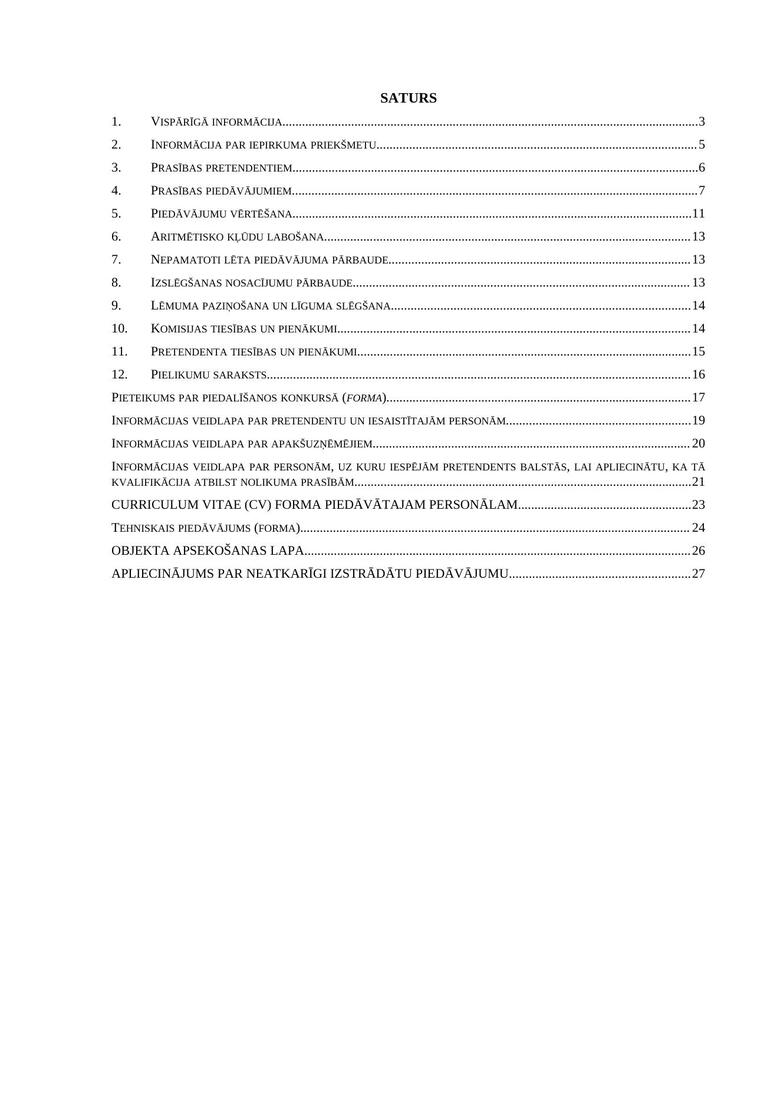
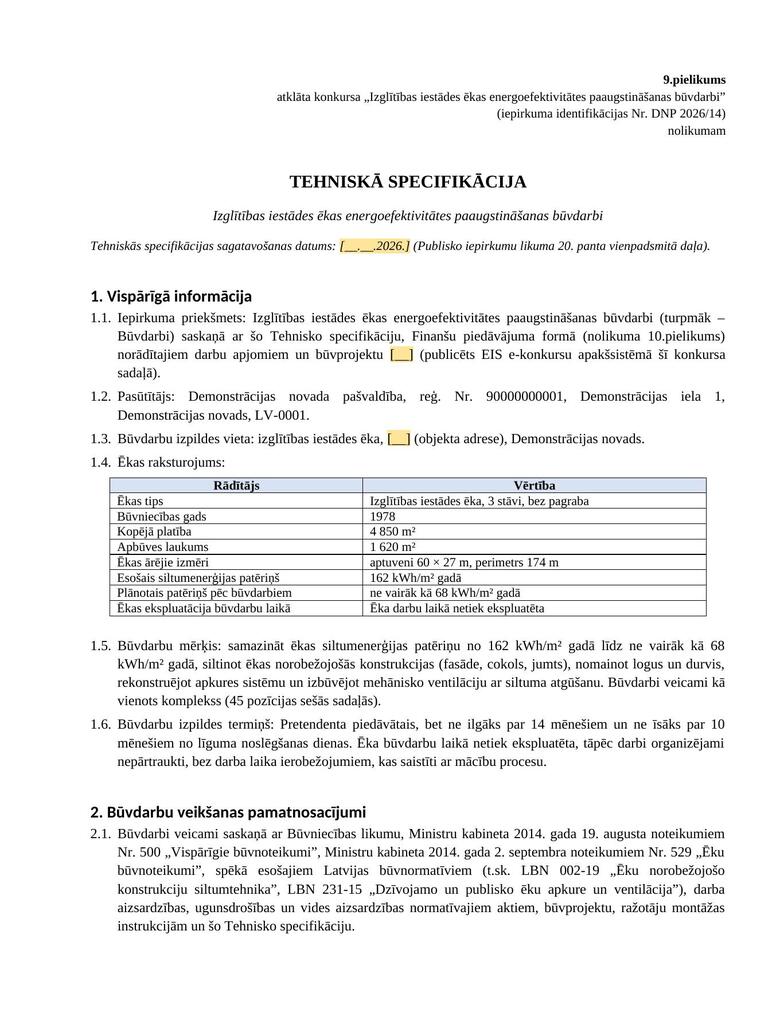
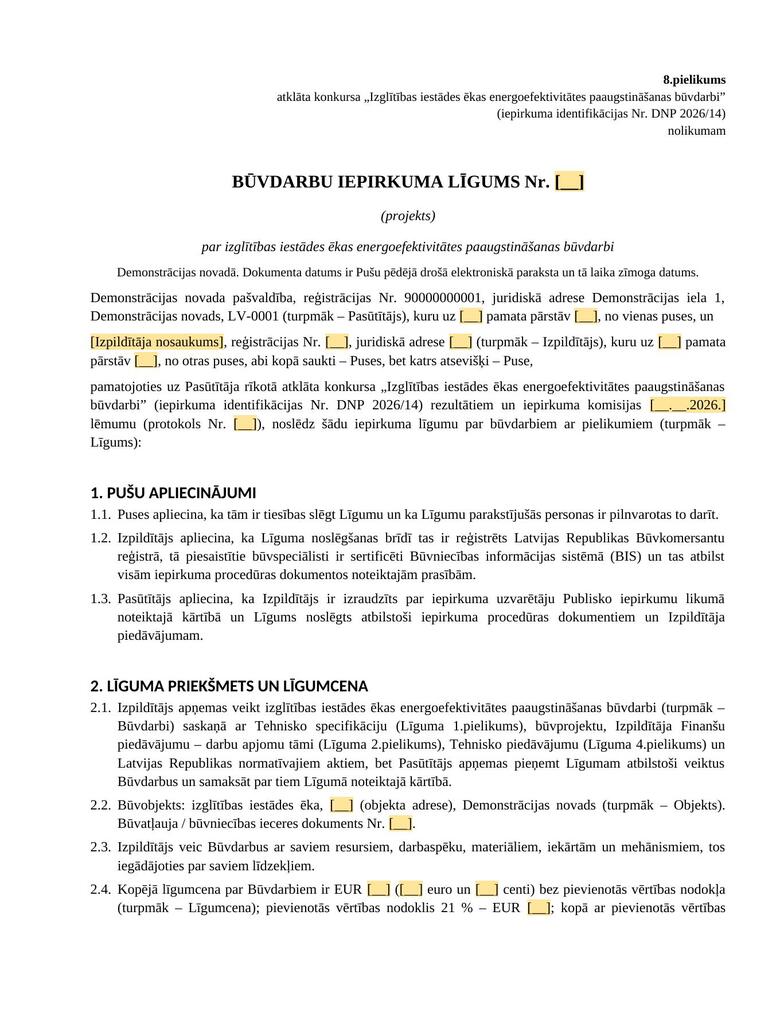
To show what this system actually produces, I wrote a fictional tender brief — energy efficiency construction work on a school, EUR 1,240,000 — and deliberately built five typical faults into it, of the kind that really do appear in tender documents. Below is what IepirkumuAI produced from it, and what it had to say about the brief itself.
7documents in the full set — tender regulations with annex forms, technical specification, draft contract, bill of quantities, experience and personnel lists, work schedule
50pages of text, of which the tender regulations alone are 30 — plus the bill of quantities in Excel across three sheets
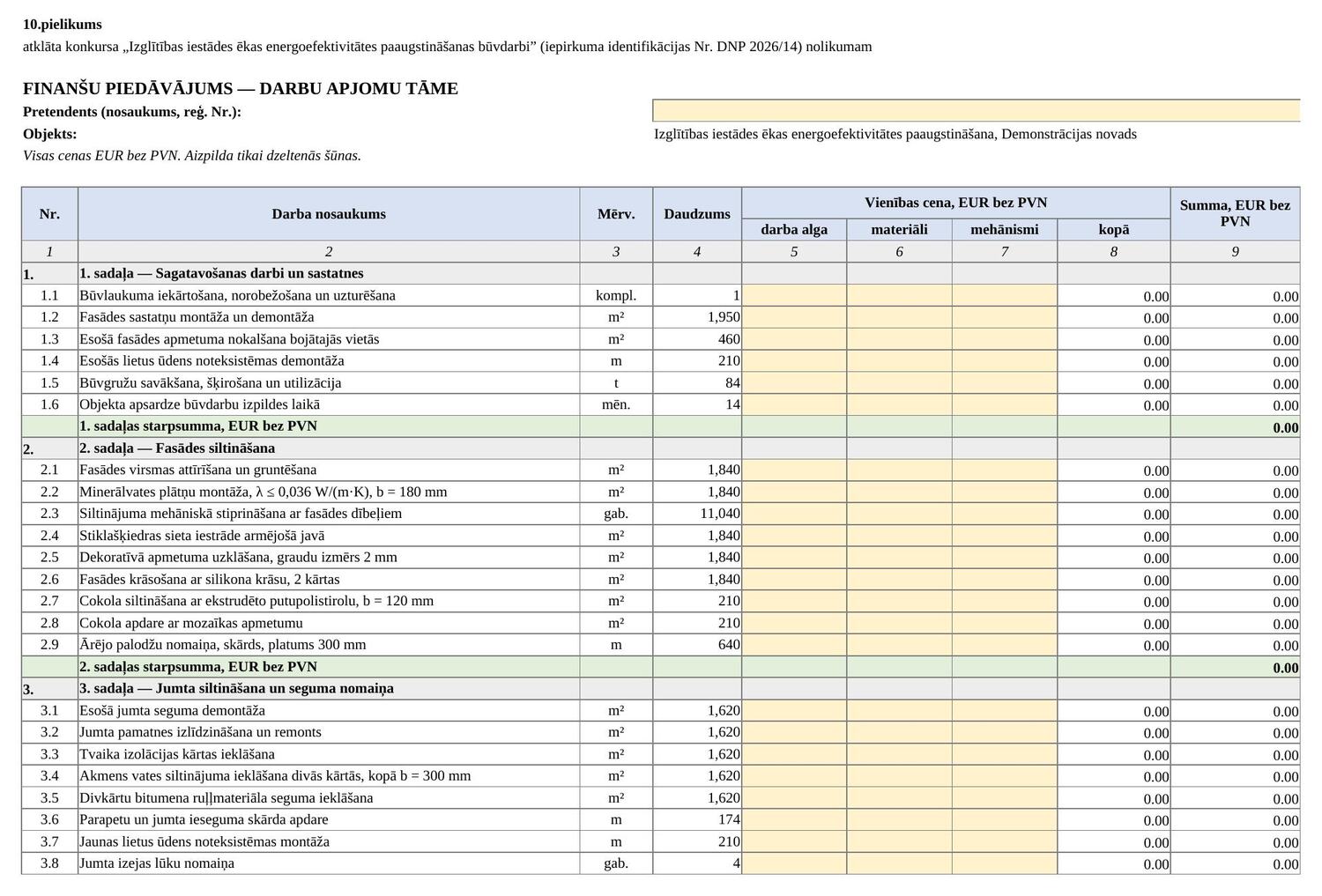
45line items in six sections, with protected formulas: subtotals, overheads, profit, VAT
Tender regulations — 12 sections and eight annex forms, 30 pagesTechnical specification — the building and the target: 162 → 68 kWh/m² per yearDraft contract — 16 sections; the yellow fields are the ones a person fills in
Financial proposal — 45 line items in six sections. The bidder fills in the yellow cells only: labour, materials and equipment. Unit price, line total, section subtotals, overheads, profit and VAT calculate themselves, and are protected against being overwritten.
What the system said about the brief
A disproportionate turnover requirement
in the brief
Average annual turnover of no less than EUR 5,000,000 — roughly four times the estimated contract value.
in the documents
EUR 2,480,000, citing Section 45(2) of the Public Procurement Law: no more than twice the contract value.
Grounds given in the analysis: Public Procurement Law, Section 45(2); Court of Justice of the European Union, Case C-218/11 Édukövízig and Hochtief. Risk level — high: disproportionate financial requirements are one of the most common grounds for a complaint to the Procurement Monitoring Bureau.
The other four were found the same way: a territorial experience requirement was removed (Sections 2 and 41(2); Supreme Court ruling SKA-1315/2016), a requirement for certificates issued in Latvia was replaced by a register check and recognition of foreign qualifications (Section 44(1)), the subjective criterion “bidder's reputation” was replaced by a measurable criterion with a point scale and a formula (Section 51(2)(3)), and an 18-day submission deadline was extended above the statutory minimum (Cabinet Regulation No. 107; Section 35).
The system also caught what I had not planted: the tax debt check sat in the wrong section of the regulations, the sample document I had used still referred to articles that have since been amended or repealed, the evaluation criterion for delivery time had no lower bound, and the tie-break procedure for equal bids had not been set in advance. All four are corrected in the documents and reasoned in the analysis.
The tender, the contracting authority, the building and every figure are invented. The set was prepared for demonstration — I do not show real client documents publicly, not even anonymised.
AI tool · document control
AI pre-check for procurement documentation
One upload, and a project's entire procurement documentation is checked against a full set of criteria, with each answer marked as settled, needing an expert, or needing a register lookup.
The problem
A project's procurement documents arrive in one pile; they have to be sorted by tender and each checked against a long list of criteria.
Done by hand this is repetitive work, and attention slips exactly where a mistake costs the most.
Risks that are only visible across all of a project's tenders at once — splitting a contract to stay under a threshold, for example — are not found at all when documents are checked one by one.
How it is built
The user uploads a whole project as a single ZIP file or as several Word files; the system groups them by tender and a person confirms the grouping.
Each tender is checked against a set of 157 questions with extracts from the law. The check runs in levels, and the next level starts only if the previous one passed.
Every answer is routed into one of three streams: answered automatically, needs expert judgement, needs a register lookup.
An aggregator looks at all of a project's tenders together and totals them against the statutory thresholds, to detect contract splitting.
The result downloads as a Word report; the data is deleted when the browser tab is closed.
The video shows a demonstration prototype: the tender regulations and draft contract in it are synthetic sample documents, not a real tender. The interface is in Latvian.
The essentials
2–3 mina full pre-check of three tenders in one session, instead of days of manual work
3 streamsevery answer is routed: answered automatically, needs expert judgement, needs a register lookup
157questions per tender, with extracts from the law
0 datanothing is retained once the session ends
Demonstration · 1 min 11 sFrom ZIP upload to finished report: automatic grouping, the check against 157 questions, the aggregator's contract-splitting analysis, and the routing of answers to an expert.
AI tool · contract data
Contract data extraction
Pulls the parties, amounts, dates and special terms out of a contract PDF into a single record that any register can import. Every value comes with a quote from the document, and every quote is checked by code, not by the model.
The problem
Contract data is retyped into registers by hand — parties, registration numbers, amounts, dates, notice periods.
AI can do this quickly, but a mistake that looks like a correct value is worse than an empty field, because nobody notices it.
Everyone who uses the data afterwards opens the contract again to see where a number came from.
How it is built
The model fills in a strict schema: for each field a value, a verbatim quote, the page and a confidence score. Without a quote it may not enter a value, and it may not calculate — a total that the contract does not state stays empty, with a note.
Deterministic code then checks every field: is the quote really in the document, do the value's digits appear in the quote, are the dates in a logical order, is the registration number in the text.
A second opinion: regular expressions find every amount, date and registration number in the text independently of the model and compare them with the model's values — in both directions.
Each contract gets a status of OK / REVIEW / ERROR and a specific list of what a person should check. Only OK rows go into the register automatically.
One record format (23 columns) for every export: email, a shared Excel workbook, Google Sheets, Notion, CSV and JSON. Personal ID numbers are masked at the point of extraction.
Cost control: a spending log, a budget and a per-run file limit; the client can switch to their own API key.
Claude APIstructured outputPythonStreamlitGoogle Sheets APINotion APISMTPpytest
The examples are two invented contracts — an office lease in a business park and a purchase of standing timber from a private individual; every party, number and amount is made up. The application sits behind a password because it runs on my API key; I am happy to demonstrate it in a conversation. The interface is in Latvian.
Measured, not claimed
A few secondsfor two contracts in one run — from PDF to a filled-in table
0quotes the validation could not find in the text — across real runs with two models
20 / 20“hard” fields — parties, numbers, amounts, dates, terms, VAT — identical in the Opus and Sonnet extractions
23 fieldsfrom every contract in one record: parties, amounts, dates and special terms, ready to import into a register
30+automated tests without the API: every kind of deliberately corrupted value produces the expected message
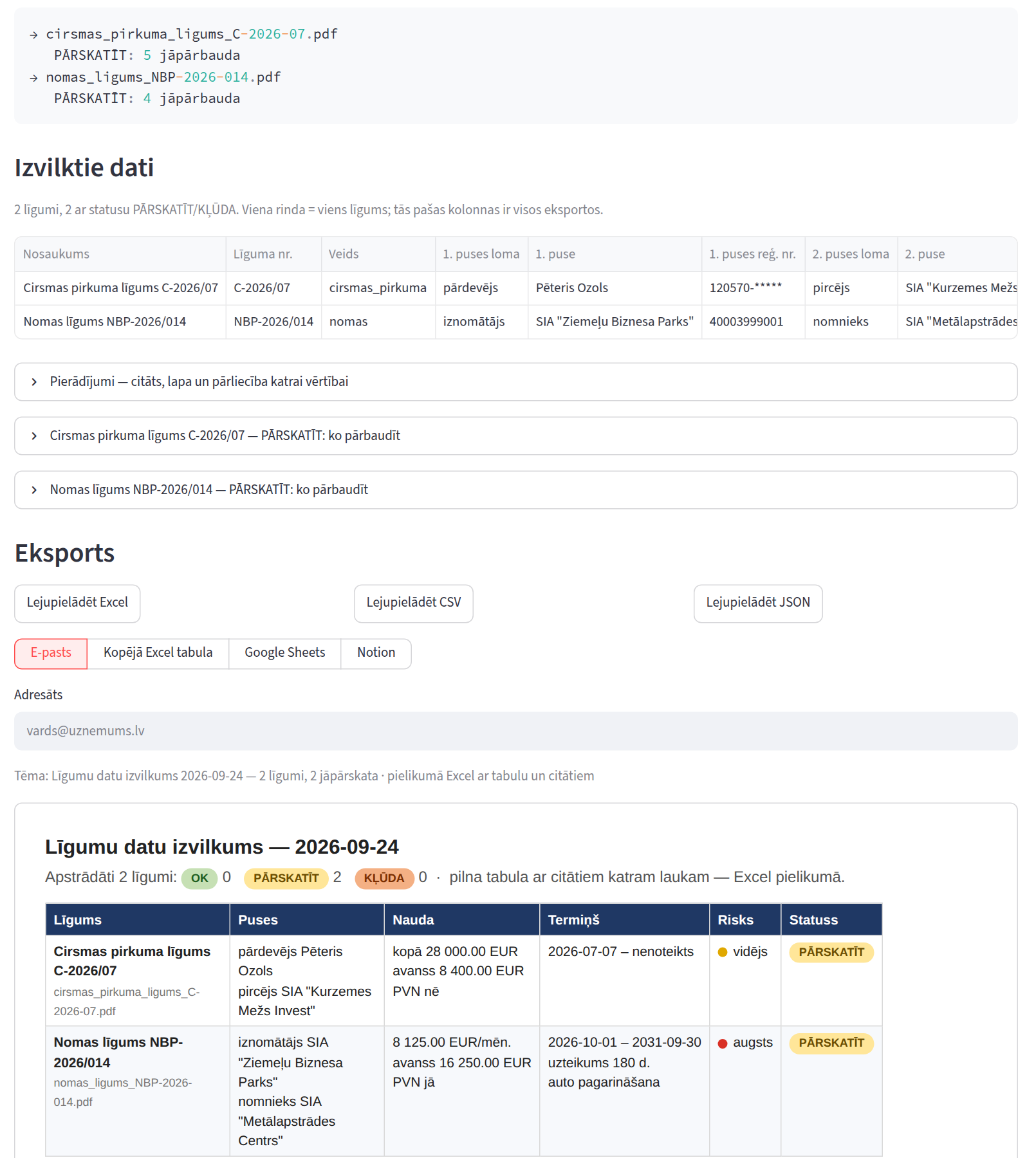
Result · two invented contractsOne view, top to bottom: the processing log, the extracted data (one row per contract), the evidence and a “what to check” list for each contract, export to Excel, CSV and JSON, tabs for email, a shared Excel workbook, Google Sheets and Notion — and the email a manager receives. Both contracts correctly get REVIEW: annexes are missing, and the lease does not state a total. The screenshot is in Latvian.
Deterministic automation · forestry
Timber stand valuation
From a State Forest Register inventory printout, it finds the compartments eligible for clear-felling, calculates the harvestable volume, splits it by species and timber assortment, and works out the maximum price worth paying for the stand — with the reasoning attached to every compartment.
The problem
A forestry specialist values a stand by hand: for each compartment the dominant species, site class, age and diameter are compared with the regulatory tables, then the volume is calculated and split by species and assortment.
One error in one compartment — a misread species formula or a wrong threshold — changes the price of the whole property, and it is only noticed if someone recalculates.
The regulatory tables and prices change, so the calculation has to be something the specialist can adjust without a programmer.
How it is built
No language model in the calculation. It is all deterministic code: one PDF always gives one result, which can be checked against a specialist's calculation. AI would be out of place here, so I deliberately left it out.
Claude vision is only a fallback for scanned PDFs, and even there the model only transcribes the lines of the page. The same parser and the same rules take it from there, and the result comes with a warning and the transcript alongside for a person to check.
Rules are data, not code. Felling age and diameter tables, species codes, assortment yields, prices and costs sit in a configuration file and a price sheet that the specialist edits themselves.
Every compartment carries its reasoning, for example “Birch, site class I: age 73 ≥ 71; diameter 33 ≥ 27 → eligible”. The specialist may override the decision, and volume and price recalculate.
Excel output with live formulas across five sheets: every step of the calculation can be traced to a cell.
Warnings, not silent processing: a protection-zone flag, an unknown species, a formula that does not add up to 10, an area checksum that does not match the printout.
Pythonpdfplumberdeterministic rulesYAML configurationExcel with formulasClaude visionStreamlitpytest
The screenshots show a synthetic inventory printout with invented data and default demo prices. The acceptance-test property is real, so I do not show its cadastral number or calculated price publicly. The application sits behind a login, and its interface is in Latvian.
Verification
Matchesthe specialist's manual calculation in the acceptance test on a real inventory printout: the same six compartments, the same volume, the same maximum price
17 centsthe only difference, in revenue — the tool does not round intermediate results; the person did
0language-model decisions in the calculation
50+automated tests, including synthetic PDFs with hard cases: two land units in one printout, a formula split across two lines, bog, clearing and meadow
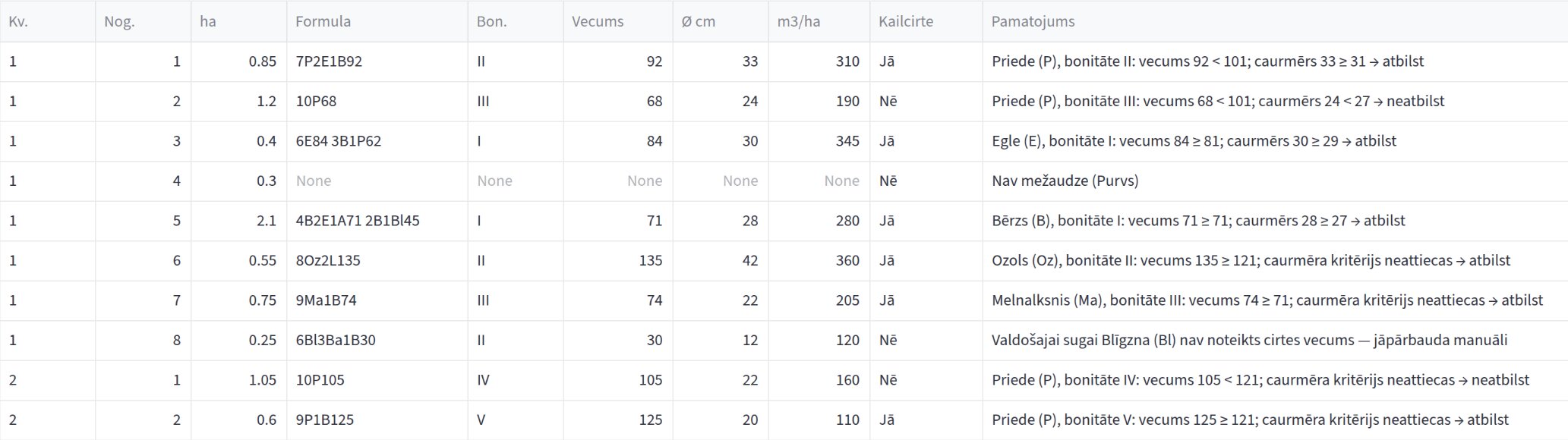
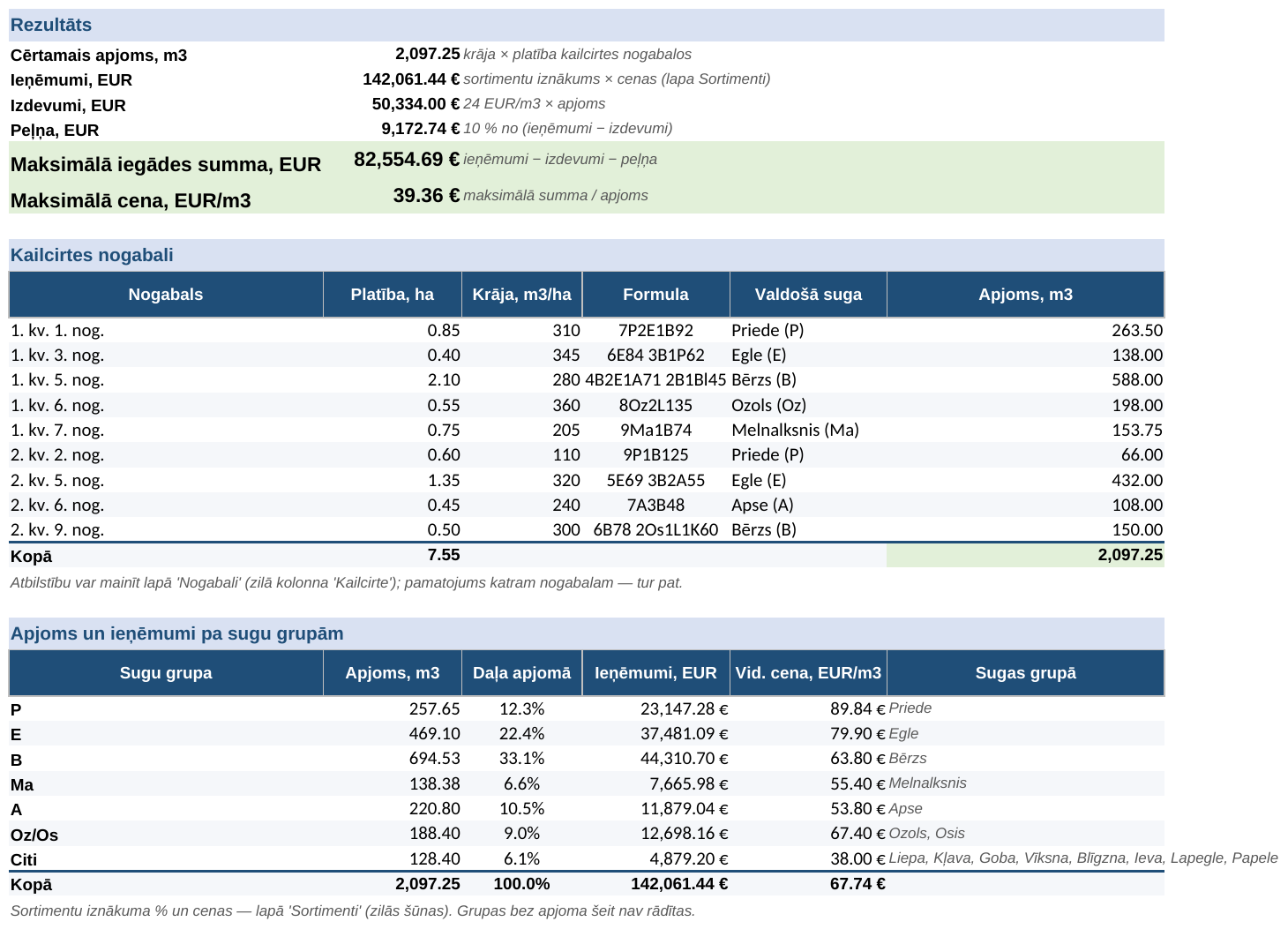
Compartment assessment · synthetic exampleThe reasoning next to each compartment. Compartment 4 is a bog, so it is not a forest stand; for compartment 8 the dominant species, goat willow, has no felling age in the regulations, so the tool does not decide on its own but passes it to the specialist. The screenshot is in Latvian.Summary · volume by compartment and speciesThe first sheet of the Excel output: harvestable volume (growing stock × area) for each clear-felling compartment, the split by species group with revenue and average price, and the result — revenue, costs, profit and the maximum purchase price. The result and the species split are formulas that refer back to the other sheets: change a price or a compartment decision and everything recalculates. The spreadsheet is in Latvian.Assortment matrix · yields and pricesEach species group's volume is split into timber assortments by yield percentage and multiplied by price. The blue cells — percentages and prices — are for the specialist to change, and everything recalculates; a check row confirms that the group totals add up to the revenue. Open the image for full size. The spreadsheet is in Latvian.
Operational scheduling · shift-based work
Match schedule for a broadcast crew
Built to solve a real company's problem: putting changes into work schedules that were planned in advance, notifying the people involved and getting each of them to confirm. The coordinator sees at a glance who has not confirmed a change yet and who needs a phone call.
The problem
The coordinator of a sports broadcast crew sends out the weekly schedule as an Excel file. When a match time or venue changes, the new version does not reach everyone.
The result: in a single month, operators turned up at the wrong place or the wrong time twice.
The file is inconsistent: dates in several formats, times as both “19:00” and “7:30 PM”, the same person as both “Jānis Bērziņš” and “J. Berzins”, plus duplicates and blank venues.
How it is built
One change flow. An edit on screen and a re-import of the file both go through the same function: the match version goes up, the change is logged, and every assigned operator gets a “was → now” message. A confirmation is valid only for a specific version, so after a new change everyone is back to “Not seen”.
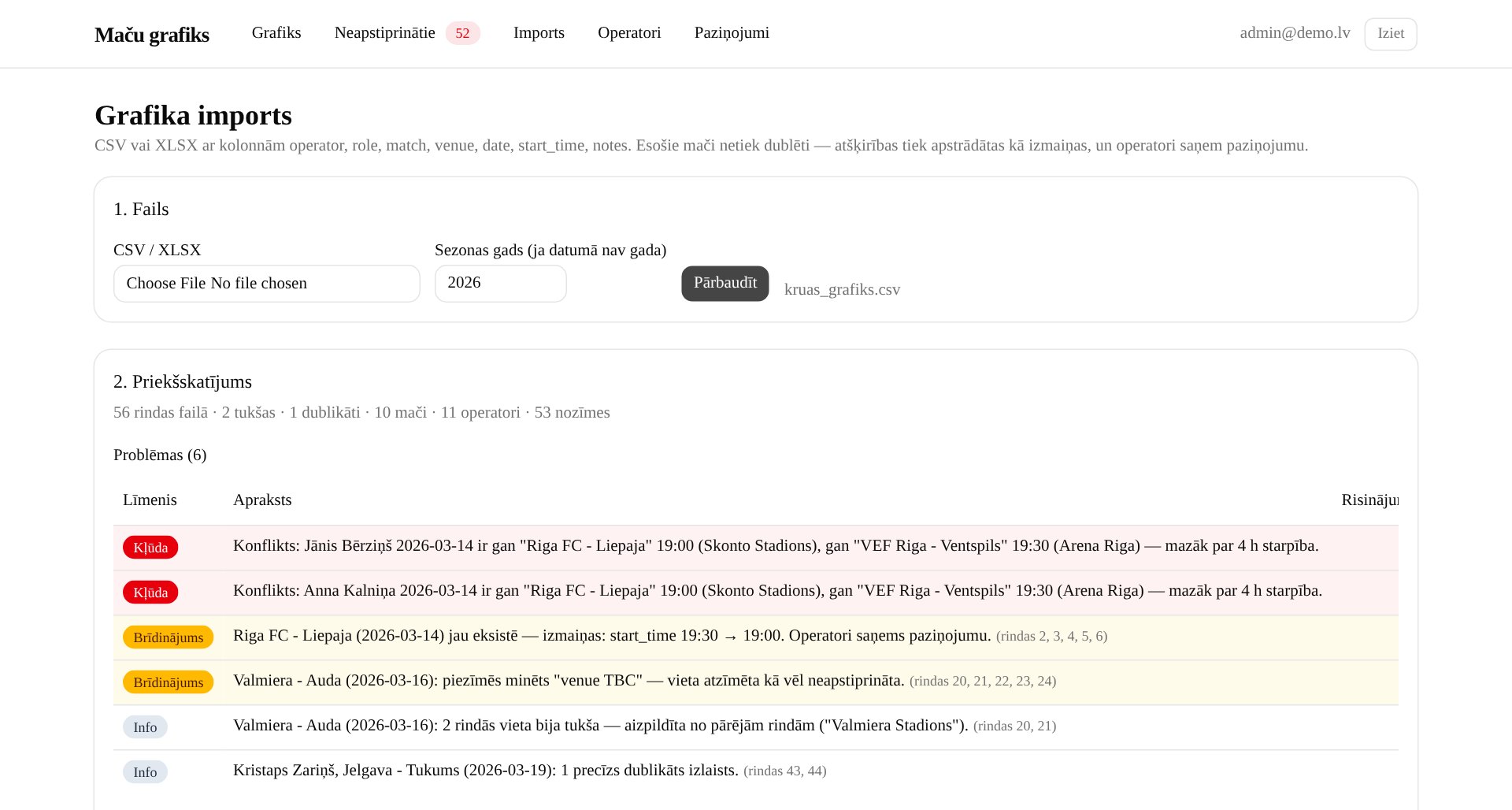
Two-step import: CSV or XLSX → preview with an issues table → written only after the coordinator confirms. An existing match is never duplicated; differences become changes with a notification.
Normalisation is pure, tested functions: dates, times, roles (CAM / Kamera / Camera) and names without diacritics or with initials. An uncertain match is confirmed by a person and saved as an alias.
Conflicts: if an operator is on two matches on the same day less than 4 h apart, the import and the save stop until the coordinator accepts it deliberately or takes the person off a match.
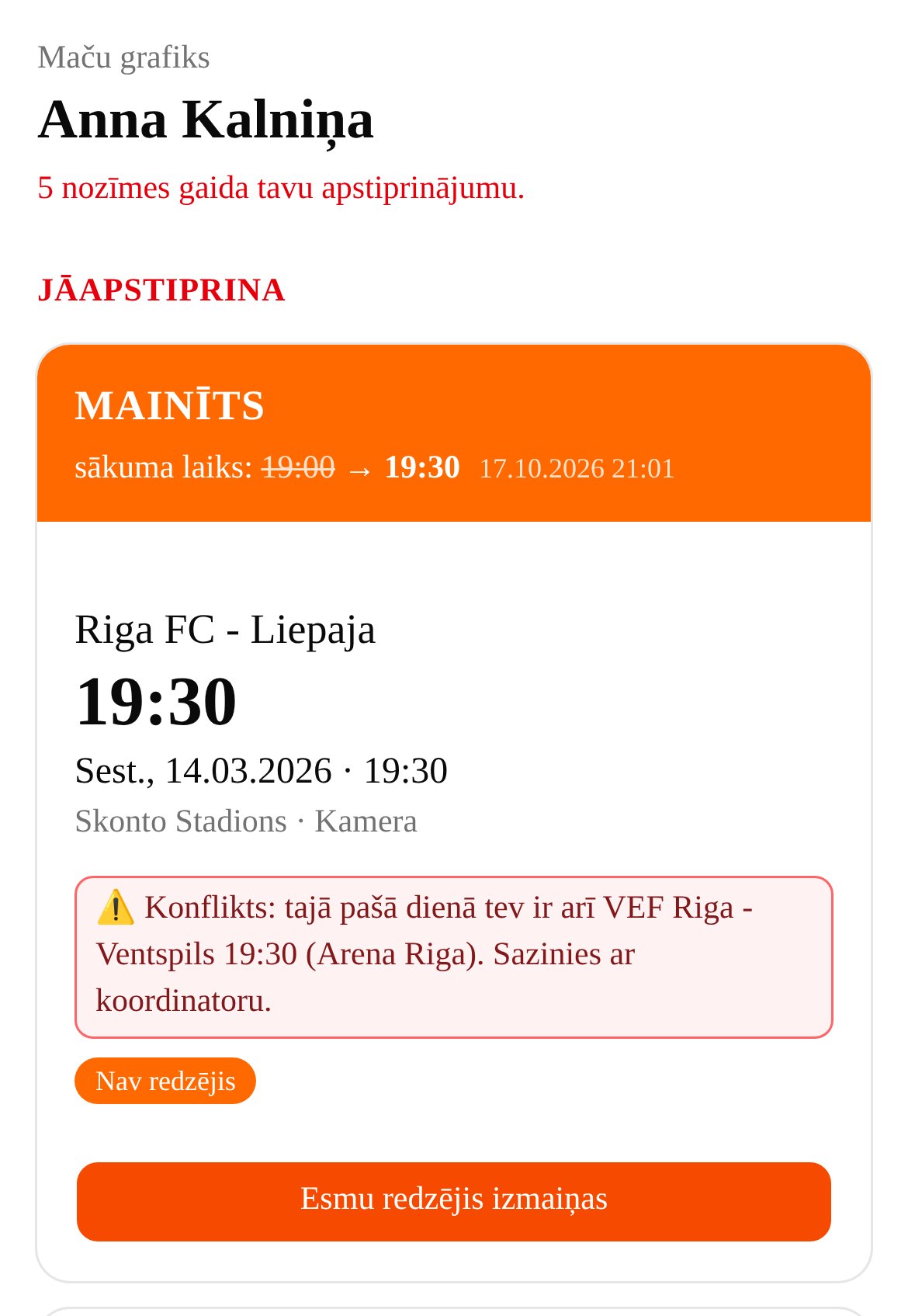
Operators never log in: a personal link on their phone or a Telegram bot with a “Seen it” button, and a calendar subscription in which unconfirmed matches are marked [JĀAPSTIPRINA] (“to confirm”).
Escalation without a person: after 2 h without confirmation the message is repeated; less than 6 h before kick-off — an urgent reminder and a red “Call” badge in the coordinator's view; at 18:00 — a summary of tomorrow's matches.
There is no language model in the system. The problem was the flow of information, not text to generate. AI was the development tool: I built it with Claude Code in phases, closing each phase with tests.
One codebase, four ways to run it: a Node server, Docker with automatic HTTPS, Windows autostart, and a Windows desktop app (Tauri) whose installer needs no administrator rights.
Adaptable to any industry
There is nothing sport-specific at its core, only general logic: employee, task, time, place, role, change version and confirmation.
It fits anywhere work follows a schedule planned in advance and changes have to reach specific people: shift work in manufacturing and logistics, security, health and social care, event and construction crews, service and cleaning teams.
Adapting it means changing the roles, the labels and the reminder timings; the change flow, confirmation and escalation stay the same.
I do not name the company. The screenshots use demo data — invented operators and matches in March 2026, which is why the change is flagged “less than 24 h”. I am happy to demonstrate the system in a conversation. The interface is in Latvian.
Checked
56 → 53rows in the coordinator's file → assignments in the schedule: blank rows and a duplicate dropped, “J. Berzins” recognised as Jānis Bērziņš
2 / 2conflicts in the sample file found and stopped before anything is written to the database
93automated tests: 77 unit tests (normalisation, import, change flow, escalation, calendar, Telegram) and 16 browser scenarios
2 daysfrom the first line of code to a Windows app with an installer
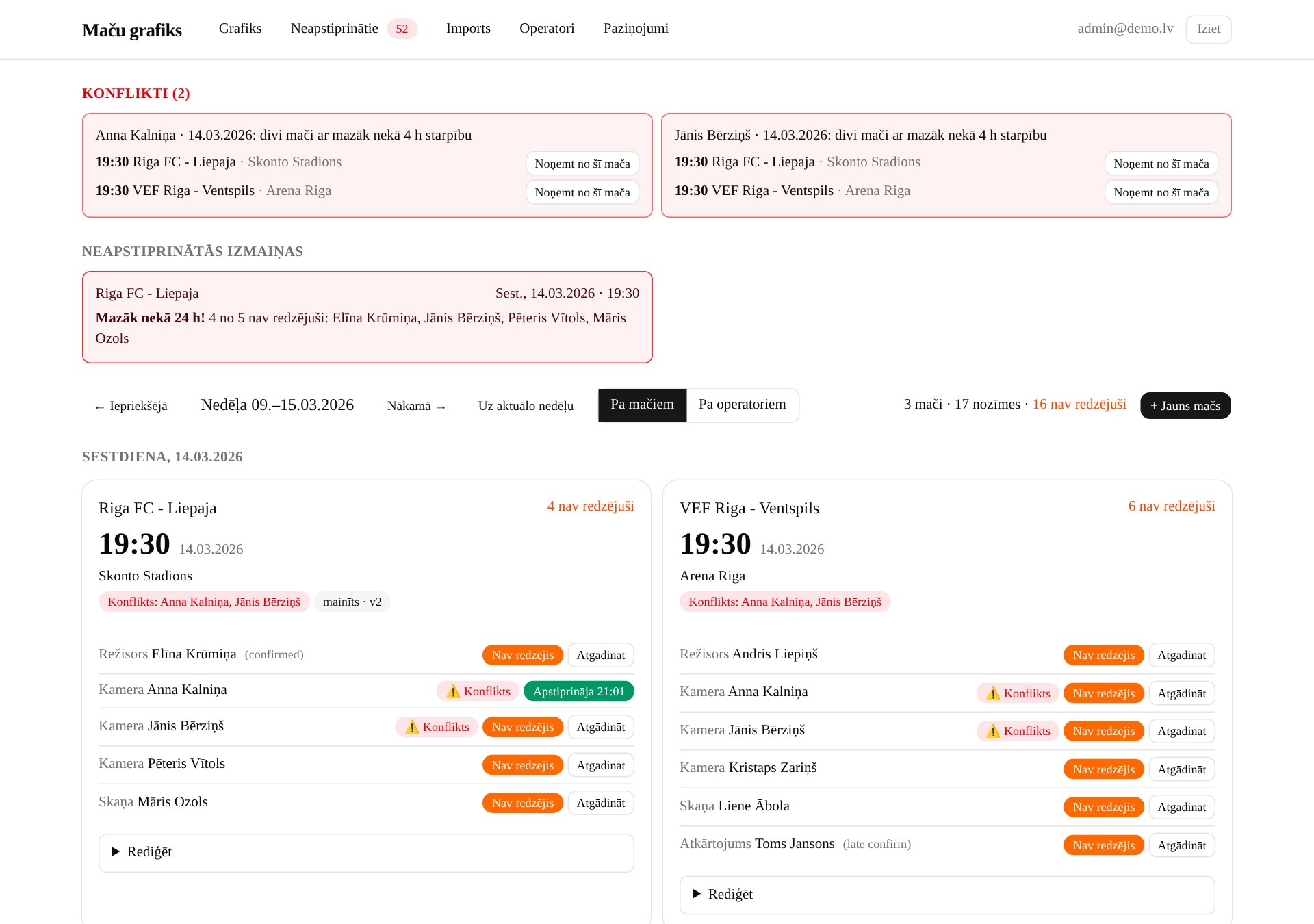
Coordinator's view · after a time change 19:00 → 19:30At the top — conflicts with a “Remove from this match” button, and unconfirmed changes. Anna confirmed the change on her phone, the other four still show “Not seen”, and each has a “Remind” button. The conflict is also flagged next to each person. The screenshot is in Latvian.
Import · issues before writingThe coordinator's file before it is written: both conflicts are errors and block the import, the change to an existing match will go out as a notification, and the blank venues and the duplicate are explained with row numbers.On the operator's phoneA personal link with no login: what changed, what it was and what it is now, and one button to confirm.
Project management · EU-funded project
EU-funded project management tool
Built for a foundation running a social rehabilitation project for people with early-stage dementia, co-financed by the Society Integration Foundation (SIF) under ESF+. One system for the whole project cycle: plan and deadlines, deviations and contract amendments, expenses, participant and visit records, indicators and interim reports to the funder.
The problem
The contract contains 18 deadline rules, many counted in working days: replying to funder queries within 5 working days, requesting an amendment 20 working days before a change takes effect. A missed deadline or an unmet indicator can cut the funding.
The approved application plan and the actual work plan diverge even before the service starts. Every difference has to be recorded, assessed and, where needed, agreed with the funder as a contract amendment.
Every three months a report with evidence is due: expenses, documents, visits, indicators. Without one system it is gathered from spreadsheets, emails and folders.
Participants' personal and health data need narrow access and an audit trail, but the organisation has no Microsoft 365 or other corporate environment.
How it is built
Deadlines are data, not code. Contract rules become deadline events with an external and an internal deadline, calculated on the Latvian working-day calendar including public holidays and transferred days. Every working-day morning the responsible roles get an email with upcoming and overdue deadlines.
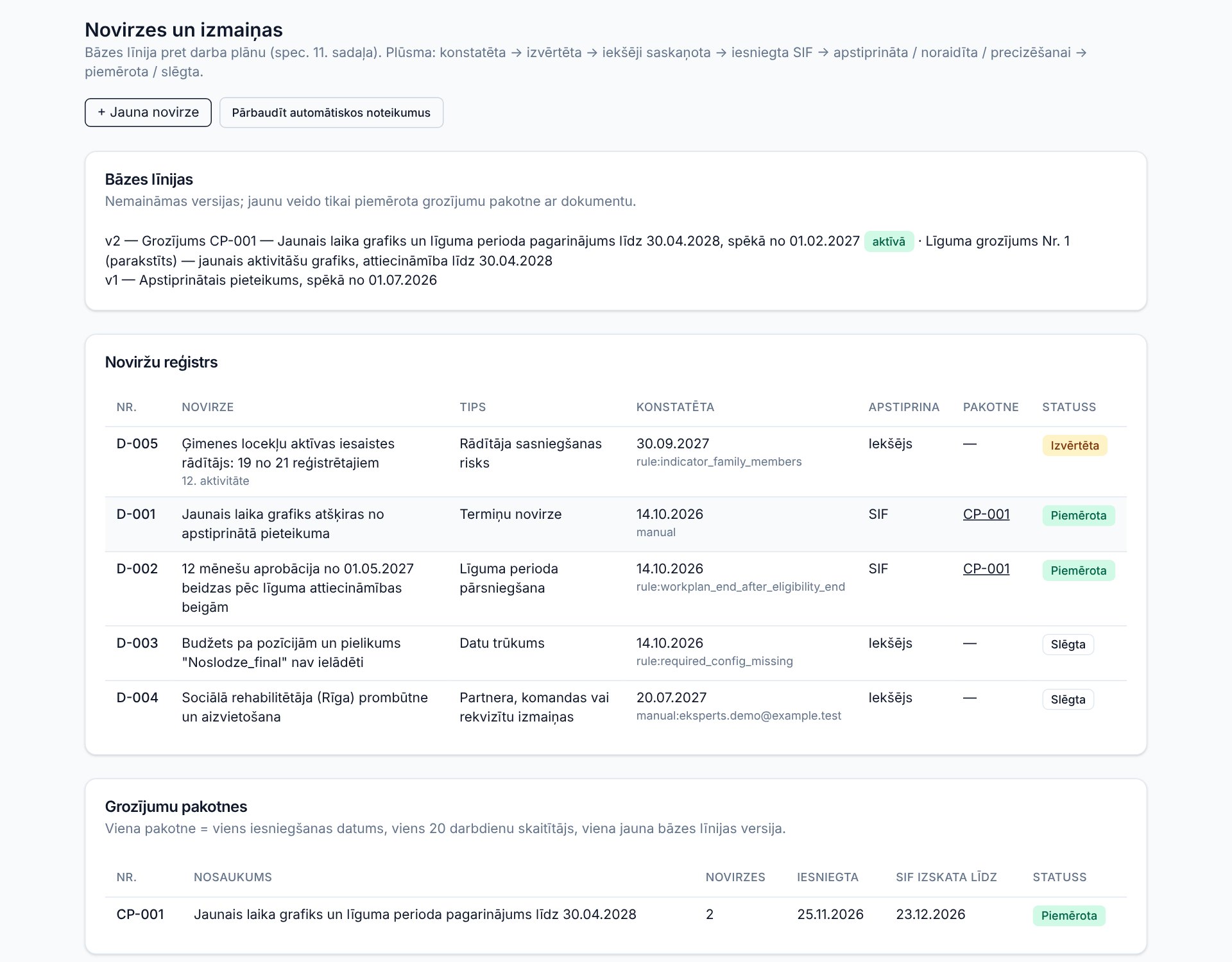
Baseline versus work plan. The approved plan version is immutable. A difference becomes a deviation with a status flow up to the funder's decision, and a new baseline comes only from an applied amendment package with a document attached.
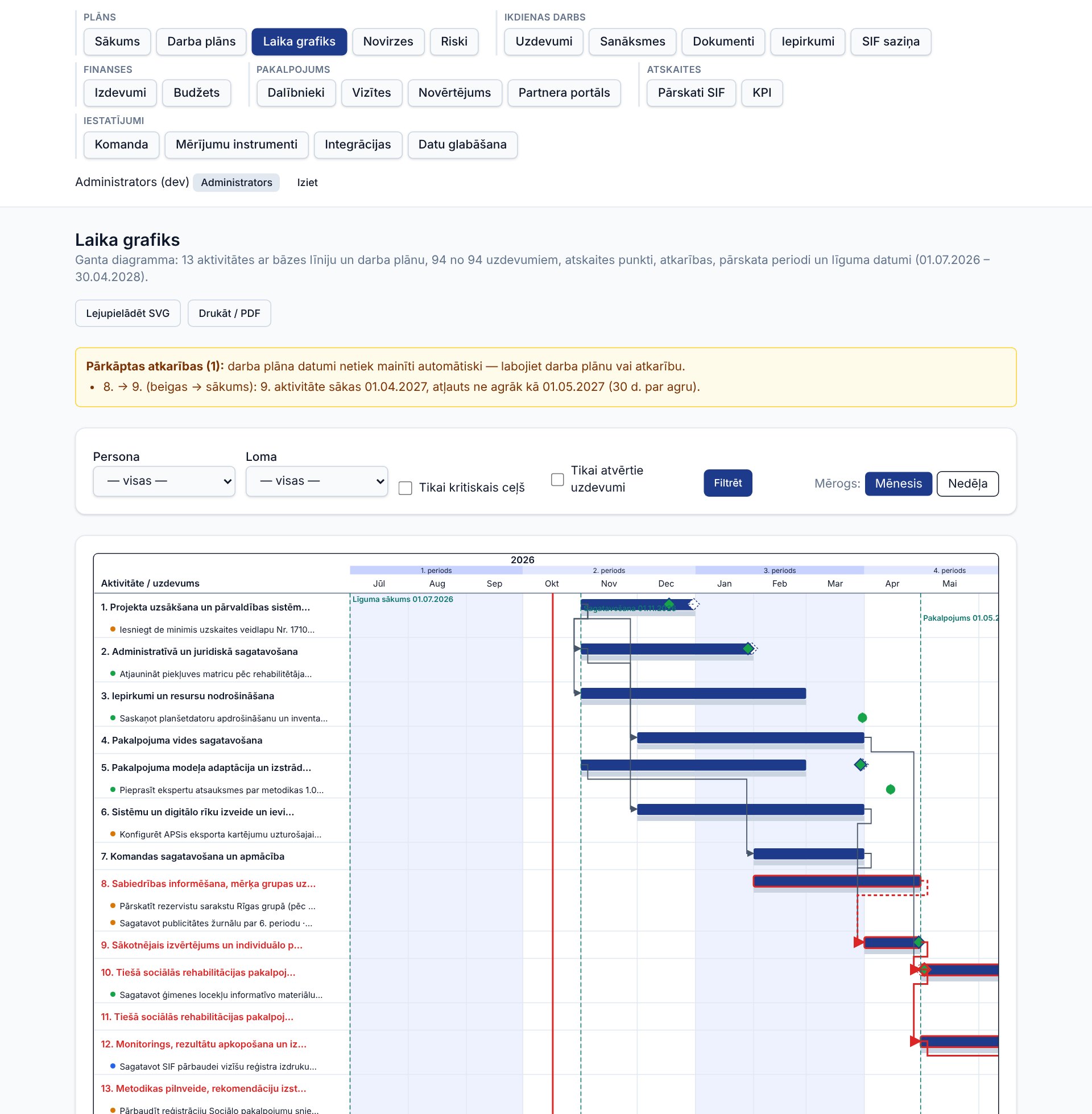
A timeline (Gantt chart) with dependencies, the critical path and resource load. If the work plan breaks a dependency, the tool warns but does not move dates by itself — a person decides.
An interim report package for each period: a completeness check with a list of gaps, a DOCX report and XLSX annexes in one ZIP. Claude drafts the text, but only from an anonymised summary — no names and no health data.
Access for 11 roles is enforced on the server. Participants' personal data sit in a separate table, everywhere else only a code (R-01) is shown, and every change goes into an audit log. After the retention period — anonymisation by a documented procedure.
A visit log on the phone, at the participant's side. Rules run on their own: two consecutive no-shows create a task for the mentor, attendance below 70 % puts a participant on the risk list, and the indicator panel shows actual against target.
The expense register with an 8-point eligibility checklist works even before the budget arrives; the budget can be imported later, and then plan versus actual and cash flow appear.
I built it with Claude Code in seven phases from a specification. It comes with a user manual for beginners and a demo database of invented data that can be switched to while the tool is in use.
Reusable for other projects
Activities, deadline rules, risks, roles, measurement instruments and the report form mapping are configuration. The tool exports them as a transfer package without data, so it can be adapted to another EU-funded or state-funded project.
I do not name the client. The screenshots use the demo database — every participant and staff member in it is invented. The interface is in Latvian.
Scope and checks
22 modulesfrom the work plan and deadlines to participant records, reports to the funder and data deletion
18contract deadline rules that the deadline engine turns into concrete dates and reminders
182automated tests: 163 unit tests (working-day calendar, deadline engine, deviation rules, critical path, data retention) and 19 browser scenarios, including access rights
4 daysfrom the specification to a complete system with demo data and a user manual
Timeline · work plan against the baselineAt the top — modules in six groups, filtered by role. In the chart: the work plan (blue) against the approved baseline (grey), reporting periods, milestones and dependencies; red is the critical path. The warning shows that activity 9 starts a month too early in the work plan relative to its dependency. The screenshot is in Latvian.
Deviations and amendmentsBaseline versions, the deviation register with its source (an automatic rule or a person) and an amendment package with the funder's review deadline.A visit on the phoneThe specialist logs the visit on the same day; the participant is shown by code.
Computer vision · AI agent
Meter reading with computer vision
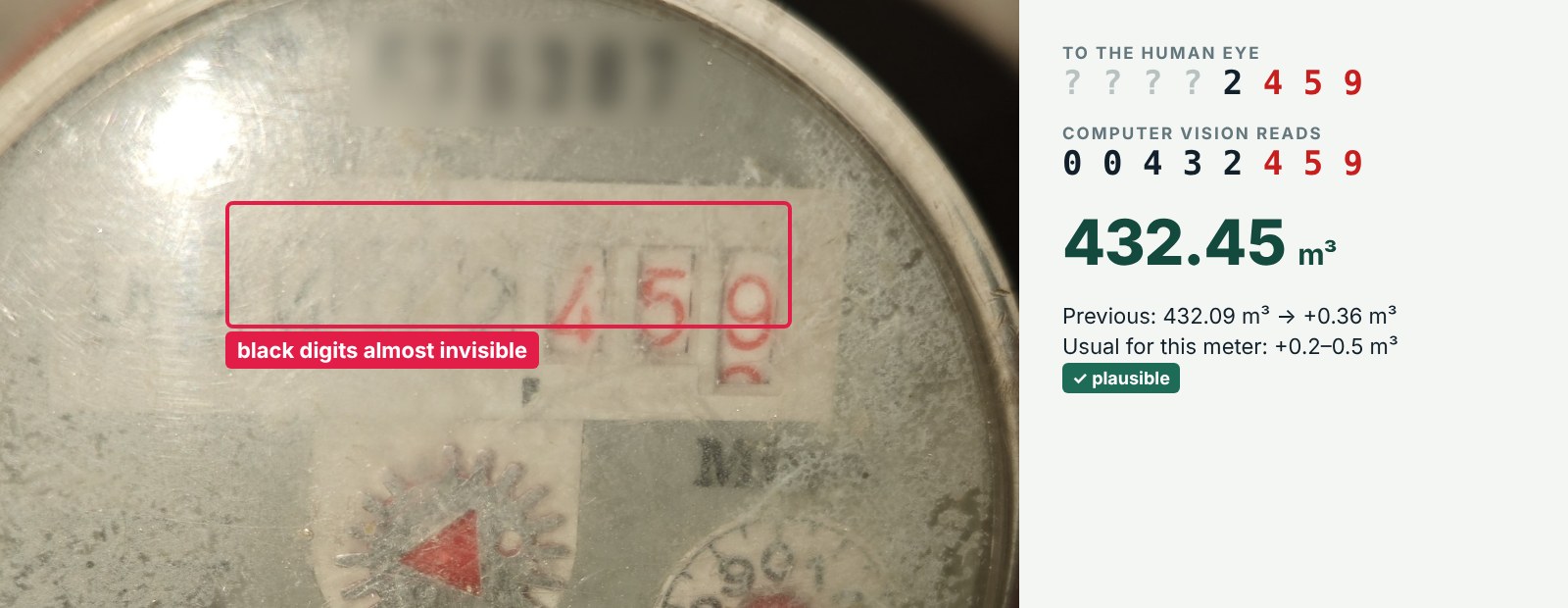
An AI agent reads the monthly meter photos — electricity, heating, cold water and two hot water meters —, checks the readings against history, writes them into an Excel table and prepares a message for the landlord. Even when a meter's glass is so damaged that the digits are no longer readable to the human eye.
The problem
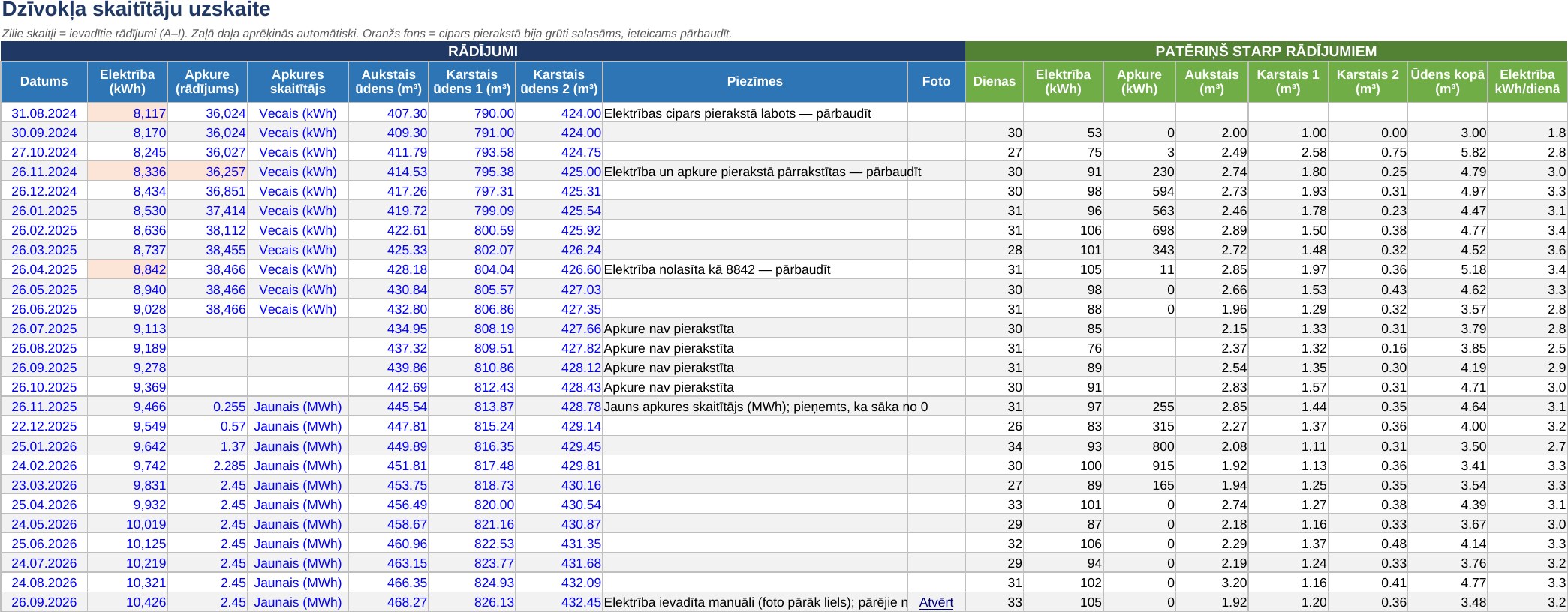
Every month the readings have to be read, written down and sent to the landlord. Writing them by hand causes mistakes — the history has several readings marked “check”.
The glass on one hot water meter is damaged: the black cubic-metre digits behind it are almost invisible, only the red litre digits are clearly visible. A person cannot reliably read the value from such a photo.
How it is built
Computer vision where the eye no longer sees. Claude vision reads the digits even when the contrast is so low that they merge with the background. A reading is never accepted blindly: it may not be lower than the previous one, and the increase has to match this meter's usual consumption.
If a digit is uncertain or the increase is out of range, the value is entered with a “check” flag and reported by email. The agent never invents a missing reading.
The agent tells two identical hot water meters apart by which reading is closer to each meter's previous value.
A workflow without a person: from the 24th of each month the agent checks a Google Drive folder every evening; if there are no photos, a reminder goes out. A Google Apps Script shrinks oversized photos beforehand.
A Python script writes the row into an Excel table with formulas, consumption and charts. If the table is open at the time, the data go into a backup file and are merged the next time.
At the end, an email with the readings, consumption and a button that opens a ready WhatsApp message to the landlord with the readings and a link to the month's photos.
Where else computer vision fits
Anywhere the data exist only in an image and a person currently retypes them: analogue gauges in plants and warehouses, worn rating plates and serial numbers, handwritten forms and certificates. The same approach — read, check against history and rules, flag the uncertain for a person.
Claude visionAI agentGoogle DriveGoogle Apps ScriptPythonopenpyxlGmailWhatsApp link
The images show my own apartment's meter and tracking table; the meter's serial number is blurred. The table is in Latvian.
Result
432.45 m³read from the meter with damaged glass; previous reading 432.09 m³, the increase matches this meter's usual 0.2–0.5 m³ a month
5meters in one monthly cycle: from photo to table, email and the message to the landlord
26 monthsof readings in one table with consumption and charts — including the earlier entries from a notebook
Computer vision · damaged meter glassThe real photo from which the agent read September's value. To the human eye only the red litre digits are clear and one black digit faintly; computer vision reads the whole value, and the check against history confirms it is plausible.Tracking table · ExcelBlue figures are the readings, the green part calculates itself. An orange background and a “check” note mark where a digit was uncertain. Open the image for full size.
Telegram bot · financial markets
Investment signal system
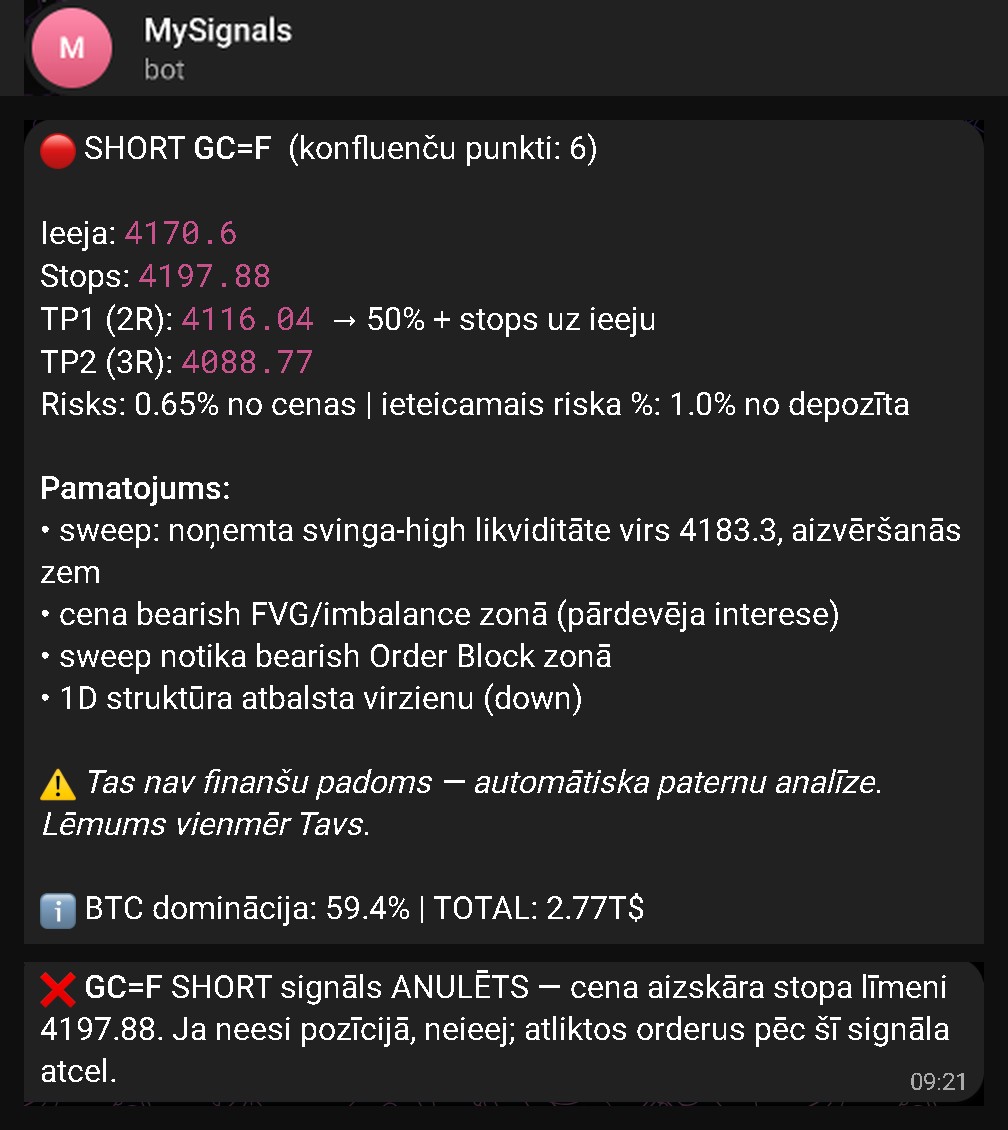
The system scans cryptocurrencies, stocks, indices and commodities around the clock and, when the market situation fits the chosen strategy, sends a Telegram signal with entry, stop and target levels, risk and reasoning. It can be adapted to any individual investment strategy and any chosen instruments.
Adaptable to any strategy
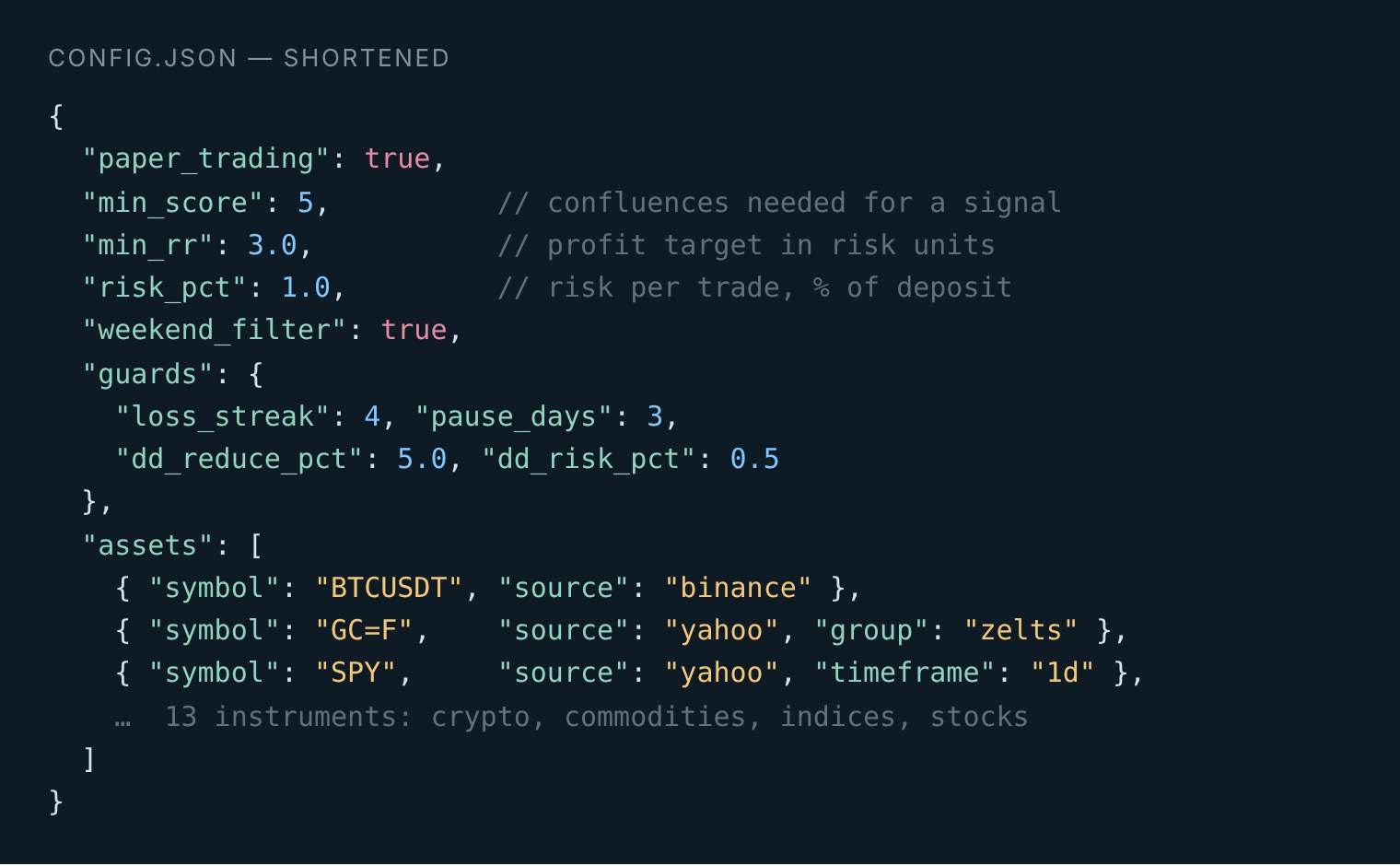
The strategy is rules, not a black box. Each condition adds points, and a signal appears only when the total reaches a threshold. The rules, their weights and the threshold can be replaced with the rules of any individual strategy.
The instruments are configuration. Any Binance pair or Yahoo Finance ticker — cryptocurrencies, stocks, ETFs, indices, commodities — with its own timeframe and grouping, so the same asset in two markets does not produce a double signal.
The risk parameters belong to the investor. Risk per trade, minimum reward-to-risk ratio, a weekend filter, deposit size for position sizing and the thresholds of the safety switches.
For a client the system is built on the instruments they choose and the strategy they define, so the decisions and the responsibility for investment results stay with the client.
How it is built
The current configuration follows one liquidity or “smart money” method: the core is a liquidity sweep with a reclaim, plus equal highs and lows, range boundaries, FVG, order blocks, RSI and divergence, and the daily trend.
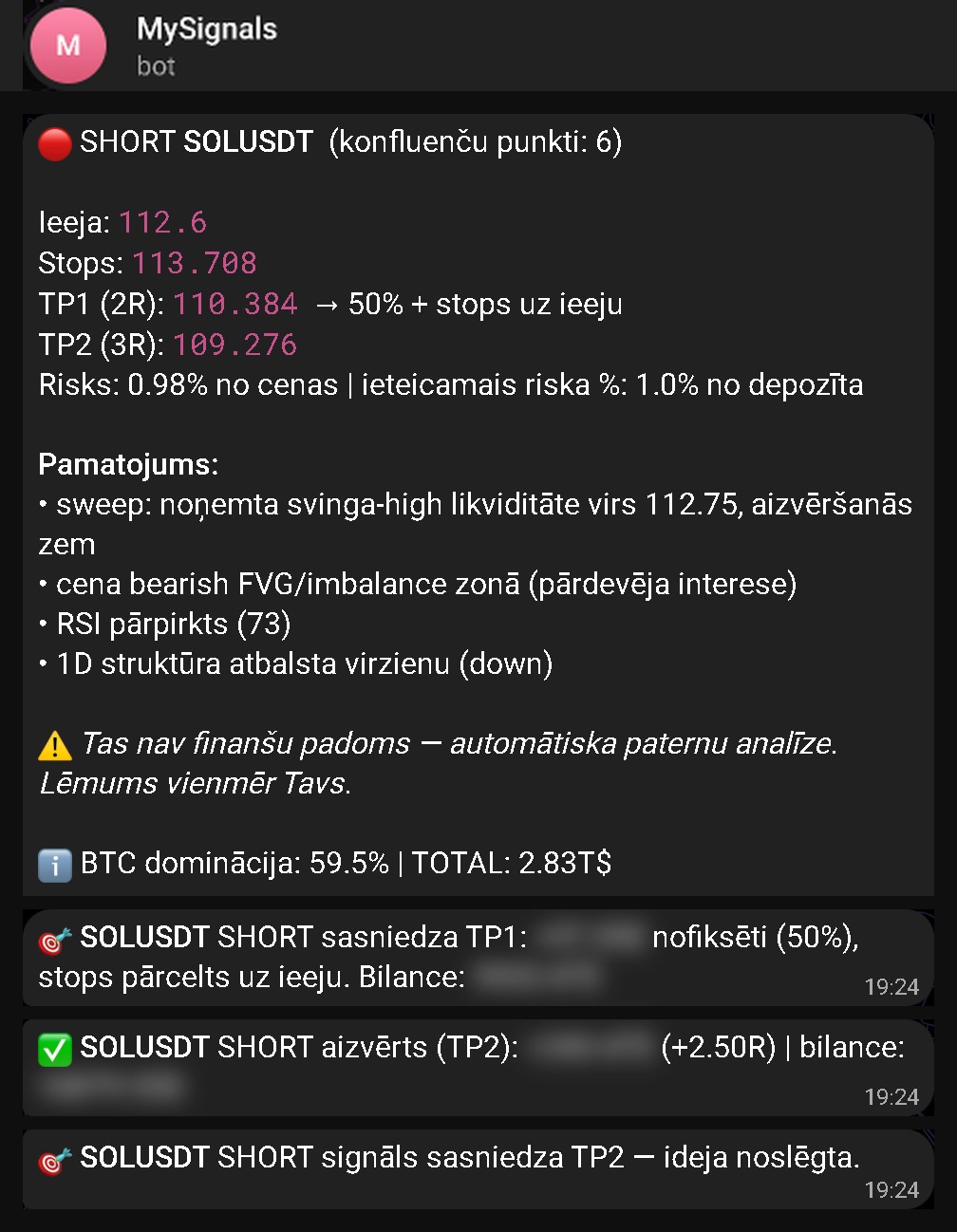
Each signal carries an entry, a stop beyond the extreme with a volatility buffer, a first target with partial profit-taking and a second target, and the risk as a percentage of price.
A virtual portfolio: every signal is played out without real money, to test the strategy in the live market before trusting it.
Self-monitoring: after four losses in a row an asset is paused for three days, after a 5 % drawdown the risk is halved, and a weekly review gives recommendations with evidence. The system never changes the strategy by itself — a person approves it.
The system places no orders on an exchange: it finds situations and explains them, the investor decides. It starts by double-clicking a file — no programming needed.
Once the strategy has been proven in the virtual portfolio, the system can be extended with automatic order execution through an exchange or broker API — with position and daily-loss limits, a kill switch and a gradual rollout from a test environment to a live account.
The screenshots are from my own Telegram; the virtual-portfolio balance and amounts are cut out or blurred. This is not financial advice. The messages are in Latvian.
Scope
13instruments in three markets: cryptocurrencies, stocks and indices, commodities
24/7scanning — a signal is evaluated after every closed candle on the 4-hour or daily chart
1 fileof configuration: instruments, strategy threshold, risk and safety switches
0real trades without a person — the system suggests, the investor decides
Strategy and instruments · configurationEverything that makes one investor different from another — threshold, risk, safety switches and the instrument list — lives in configuration, not in code.
Signal → TP1 → TP2A real signal on SOLUSDT: first target — half the position closed and the stop moved to entry; then the second target and a result of +2.50R (in risk units). Amounts are blurred.Signal → stopA real signal on gold that ended at the stop. The system reports its failures, not just its wins.
Web application · finance
InvoiceAI
An invoicing system for my own company: outgoing invoices, recognition of incoming invoices straight from the mailbox, and matching payments against the bank statement.
The problem
Incoming invoices arrive by email in various formats, and their data is retyped by hand.
Payments have to be reconciled against the bank statement manually, line by line.
Clients, products, outgoing invoices and reports live in separate files that do not talk to each other.
How it is built
React front end, Node/Express API and PostgreSQL; JWT authentication with data separated per company — one user can work across several.
An IMAP connection to the mailbox: the system collects invoices from email itself and reads them with AI, storing a confidence score for every recognised field.
Bank statement processing and automatic matching of payments to invoices by account number and amount; preparation of the payment file for the bank.
PDF invoice generation and sending, reporting, and voice input for quick entry.
In the demo every supplier, client and amount is invented. Invoice creation, bank statement import and payment matching work fully; mailbox reading and AI invoice recognition are deliberately switched off so that public access does not run up costs. The working version, which holds real company financial data, is not shown.
The essentials
Email → invoicethe system collects and reads invoices from the mailbox itself; manual entry disappears
Automatic matchingpayments from the bank statement find their own invoice
In daily usenot a prototype on a shelf — the system runs the company's day-to-day invoicing
No-code automation · service management
Social services management system
Clients, sessions, individual plans and assessments in one connected structure, with automatic reminders — built on existing platforms, with no development work.
The problem
Client records, the session schedule, individual plans and assessments live separately and do not talk to each other.
Reminders to clients and notices about schedule changes have to be sent by hand, so they get forgotten.
Producing a report means gathering the same information again every time.
How it is built
Five linked databases: clients, sessions, individual plans, assessments and staff — every record visible from all sides.
An intake form for new clients, a calendar view of sessions, and filtering by status instead of written reports.
Zapier and Make automations: email reminders to clients about sessions and notices about schedule changes.
Staff roles with different access levels — coordinator, specialist, administrator.
In the demo every client, staff member and record is invented. The real system, which holds client data, is not shown publicly. The demo content is in Latvian.
The essentials
5 databasesclients, sessions, plans, assessments and staff in one connected structure
Daysnot months — the tool matched to the size of the problem
€0development budget; platform subscriptions only
AI agent · publicity
Publication visual
Turns finished work — a folder, a set of documents, or the output of a chat — into a publishable visual in a Figma file, in three formats. It can be run from any project, including the output of another AI system.
The problem
When the work is done, it still has to be told about — and that means a separate job for a designer, with a brief, brand requirements and a place in the queue.
Three channels need three formats, and in each the content has to be different, not merely rescaled.
When publishing tender or project results, part of the information must not go out — and that is usually noticed at the last moment, or not at all.
How it is built
It reads the context itself and pulls out a headline, a summary and two to four key facts.
It sets the style itself: it finds the organisation's brand colours on its website, picks a palette and checks the contrast. Nobody writes a design brief.
A confidentiality gate: it publishes only what may be published — the final decision, the winner, the contract value, the deadlines. Internal evaluation, other bidders' proposals and personal data stay out, and the agent states exactly what it left out and why.
At the end it takes a screenshot of its own work and checks that the text is legible and nothing overlaps; if it is not, it fixes it before handing over.
It works through an MCP connection to Figma, and is packaged as a reusable skill rather than a one-off conversation.
The output is vector graphics, so the A4 format is meant for print and handouts rather than the screen — it scales without loss of quality. The formats are a setting, not a limit: the agent can be rebuilt for any size.
A person publishes, not the agent. The final sign-off — factual accuracy, confidentiality and visual quality — is given by a specialist. Legal responsibility stays in their hands.
ClaudeMCPFigmaskill packagingbrand research
This agent is built to work on the output of other systems. A tender prepared by IepirkumuAI becomes the input here: a publishable announcement comes out of a decision document with no step in between. That is also why the confidentiality filter sits in the agent rather than in someone's head — in tender documents, what may be published and what may not sit side by side.
Before and after
One publicity visual
before
after
4 h of manual layout work → a few minutes
2 → 0specialists to wait for: a lawyer to check the content and a designer to lay it out
3 formats1080×1080 for social media, 1200×630 for banners and A4 for print — in one file, with the content adapted for each rather than rescaled
A note on data
None of the links on this page lead to a system holding real data. Where a system works with a company's financial data or with client personal data, what is publicly available is a separate demo version with invented content. That is deliberate: an automation specialist sees more of a company's internals than almost anyone else, and a portfolio is not the place to demonstrate it.
Approach
How I work
01 — Starting point
I start with the process, not the tool
First I establish where the time goes and what it costs. Only then do I decide whether the answer is a Zapier scenario, an AI workflow or a separate application. The other way round usually ends in an impressive tool that nobody uses.
02 — Measurement
I measure the result in hours
Every solution has a “before” and an “after” number. It is the only way to prove that the automation paid for itself, and the only way to decide what to automate next.
03 — Trust
I do not trust AI blindly
In critical places the sources are files inside the system, the output is verified by a script, and what the system does not know is flagged rather than invented. Automation only pays off if the result does not have to be checked again from scratch — otherwise the time saved comes straight back.
04 — Finishing
I finish it into use
Most of my working life has been spent implementing systems in organisations where people have to start working differently. Building a prototype is quick; getting it still used in the third week is the real work.
Experience
Twenty-five years in processes
Before the AI solutions there was ERP and POS system implementation, project management and sales. That is the part which explains why the systems I build reach actual use.
2020 — present
Kasway · Founder, AI solutions developer
AI and automation solutions for documents and processes — from process analysis and prototype through to a working system and user training.
2023 — present
Riga East University Hospital · Consultant, client management processes
Designing the visitor flow concept and overseeing its implementation at one of the largest hospitals in Latvia.
2012 — 2023
LATSIGN · Project manager, municipal and key accounts
Infrastructure project management: budget, resources, cost control, risk and change management; teams of up to 10 people. Public tender submissions through the national e-procurement system.
2011 — 2012
ERP PRO · Sales project manager
Contract with a 170-store retail chain and the sales control and analytics system built for it. MS Dynamics AX/NAV, QlikView.
2008 — 2010
Biznesa Pamati · Founder and director
An accounting services company built from nothing: internal processes, contract delivery control, team. The company was later sold and is still trading today.
2002 — 2007
Ankravs · Project manager
ERP and POS system development and implementation projects. Exclusive representative in Latvia for Nordic ID warehouse tracking solutions.